Home » CASE STUDIES & ARTICLES » What Is a Digital Menu Board? Types, Uses & How Digital Display Boards Work
What Is a Digital Menu Board? Types, Uses & How Digital Display Boards Work
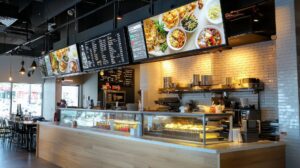
A digital menu board is a screen-based display board used to show menus, pricing and promotions, updated in real time instead of printed and reprinted by hand. It’s one of the most common types of digital electronic boards in South African restaurants, cafés and quick service outlets today, and it’s usually the first thing a customer looks at before they order.
If you’re comparing digital menu boards, digital display boards and other electronic display options for your business, this guide covers how they work, the different types available, what they’re used for, and what to expect in terms of cost in South Africa.
Key Takeaways
- A digital menu board is a type of digital display board that shows menu items, prices and promotions on a screen, managed through cloud-based content management software.
- Digital menu boards come in single-screen and multi-zone layouts for indoor or drive-thru-rated configurations.
- They’re used mainly by restaurants, cafés, QSR and franchise groups, with digital information display boards also used for corporate communication.
- A digital menu board differs from a general digital signage display (used for promotions/education) and a video wall (used for large-format branding) – see the comparison table below.
- Cost depends on screen size, number of zones and hardware configuration; DMX supplies hardware, software (Harmony), installation and support as one package.
How Does a Digital Menu Board Work?
A digital menu board pairs a commercial-grade screen with a media player – a small device connected via HDMI that runs and displays your content – and cloud-based content management software. Instead of a fixed printed board, the screen pulls its content from that software, which is how prices, specials and imagery can be changed in minutes rather than reprinted.
On DMX’s digital menu boards, that software is Harmony: a cloud content management platform that lets you build layouts from a template library, schedule content in advance, and push updates to a single screen or an entire network of locations at once. This is also what makes dayparting possible – automatically switching a digital sign board from a breakfast menu to a lunch menu to a dinner menu on a set schedule, with no one touching the screen.
Because the screen, media player and software work together, a digital menu board is really a small digital signage system built for one specific job: selling what’s on your menu, accurately and instantly.
Types of Digital Menu Boards and Display Boards
Not every digital menu board looks or works the same way. Two distinctions matter most when you’re planning a layout: how many screen zones you need, and where the screen will physically sit.
Single-Screen vs Multi-Zone Menu Boards
A single-screen digital menu board displays one continuous menu – straightforward and well-suited to smaller counters or businesses with a compact offering. A multi-zone digital display board splits the same screen (or a bank of screens) into separate sections, so a business can show its core menu alongside a dedicated zone for drinks, sides, specials or promotions. Multi-zone layouts are the more common choice for QSR and franchise environments, because they let a business upsell without cluttering the main menu.
Indoor vs Drive-Thru Digital Menu Boards
Indoor digital menu boards are mounted above the counter or till point, where customers order face-to-face. Drive-thru digital menu boards use the same underlying digital sign board technology but in weatherproof, high-brightness hardware built to stay readable in direct sunlight and stand up to outdoor conditions. Both run on the same content management software, so a business with counter and drive-thru screens can update pricing across both from one place.
What Is a Digital Menu Board Used For? (Industries & Use Cases)
Digital menu boards and digital advertising boards are most associated with hospitality, but the underlying technology is used more broadly wherever a business needs to display information that changes often:
- Restaurants, cafés and QSR: the core use case – showing menus, pricing, combos and limited-time offers, with dayparting for breakfast, lunch and dinner.
- Franchise groups: keeping pricing and branding consistent across every location by pushing one update to the whole network.
- Drive-thru operations: outdoor-rated digital signboards that keep ordering fast and accurate without a member of staff updating a physical panel.
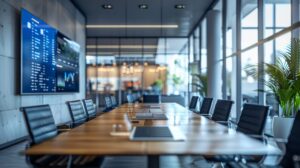
- Corporate and financial environments: digital information display boards used for internal or customer-facing messaging.
Whatever the setting, the goal is the same: replace a static, manually updated board with an electronic display that can be changed in minutes.
Digital Menu Board vs Digital Signage Display vs Video Wall – What’s the Difference?
Digital menu boards, digital signage displays and video walls are all digital display boards at their core, but they’re built for different jobs. Here’s how they compare:
| Solution | Best For | Typical Use Case |
|---|---|---|
| Digital Menu Board | Real-time menu and pricing updates | Restaurants, cafés, QSR, drive-thru |
| Digital Signage Display | Sales promotions and product education | Retail promotions, in-store customer messaging |
| Video Wall | Large-format branding and high-impact visuals | Flagship stores, lobbies, corporate branding |
If your priority is showing what’s for sale and at what price, a digital menu board is the right fit. If you need broader promotional or educational messaging around the store, a digital signage display is the better tool. If the goal is a large-format visual statement at an entrance or lobby, a video wall is built for that instead. Many DMX customers run more than one of these together as part of a wider digital signage setup.
How Much Does a Digital Menu Board Cost in South Africa?
There’s no single fixed price for a digital menu board – cost depends on a few factors: screen size, how many zones or screens you need, whether it’s an indoor or drive-thru-rated unit, and what content management and support package is included. A single-screen counter menu board will cost less than a multi-zone, multi-screen drive-thru setup.
DMX quotes digital menu boards as a full package – hardware, the Harmony content management software, installation and ongoing support – rather than pricing a screen on its own. This makes it easier to budget accurately, since there’s no separate line item for software or a media player to source elsewhere. For an accurate quote based on your layout, get in touch with the DMX team.
Frequently Asked Questions
What size screen do I need for a digital menu board?
Screen size depends on viewing distance and how much you need to show at once – a compact counter menu sign needs less screen real estate than a multi-zone drive-thru board. DMX can recommend a size once they know your layout and viewing distance.
Can I update pricing myself?
Yes. Digital menu boards run on content management software (Harmony), so you can update prices, swap out promotions and change layouts yourself, without needing a technician or reprinting anything.
Does a digital menu board work for drive-thru?
Yes – drive-thru digital menu boards use the same content management system as indoor screens, just in weatherproof, high-brightness hardware built for outdoor visibility.
How is content managed across multiple screens or locations?
All updates run through the same cloud-based content management platform, so you can schedule and push changes to a single screen or an entire multi-location network from one place.
What’s the difference between a digital menu board and a digital sign board?
A digital menu board is a specific type of digital sign board – it’s built and configured for showing menu items and pricing, while “digital sign board” or “digital display board” is the broader category that also covers promotional and informational electronic displays.
Glossary
- Dayparting: scheduling different menu content to display automatically at set times of day – e.g. breakfast, lunch, dinner – on the same screen.
- Content management (CMS): the software layer (Harmony, on DMX systems) used to build, schedule and update what appears on a digital menu board or any digital display board.
- Template library: a catalogue of pre-built menu board layouts a business can use as-is or customise, instead of designing a layout from scratch.
- Media player: the device connected to a screen via HDMI that runs and displays content sent from the content management software.
- Electronic display / electronic sign board: general terms for any screen-based board used to show information electronically, of which a digital menu board is one type.
Choosing the Right Digital Menu Board
A digital menu board is worth choosing over a printed menu the moment your pricing, offers or hours change more than occasionally – which, for most restaurants, cafés and QSR outlets, is constantly. Whether you need a single indoor screen or a multi-zone drive-thru setup, the type of board should match how your menu actually changes day to day, not just how it looks.
DMX’s digital menu boards are supplied as a full package – hardware, the Harmony content management platform, installation and support – and sit alongside DMX’s wider digital signage range, including video walls and digital shelf displays, for businesses that want more than one type of display board working together.
Ready to see what a digital menu board could do for your menu? Get in touch with DMX Africa for a free consultation.
BLOG POSTS